
Excel, PowerBI, and the Scale Problem for Bordereaux Analytics
A Lloyd's syndicate receives bordereaux from 40 coverholders monthly. 2.3 million rows of premium and claims data. Portfolio questions like "what's our California earthquake exposure?" should be instant. With traditional tools, they take days.
Not because the tools are bad. Excel and PowerBI excel at what they were designed for. Bordereaux analytics at Lloyd's scale presents specific challenges these tools weren't built to handle.
The Data Volume Challenge
Bordereaux data has distinct characteristics that create compounding complexity:
Volume: A mid-sized Lloyd's syndicate might process 40 binding authorities, generating 2.5 million rows monthly requiring analysis across premium and claims data.
Format diversity: Each coverholder submits in their own format. Dates as DD/MM/YYYY or MM/DD/YYYY or YYYY-MM-DD. Territories as ISO codes or full country names. Perils using Lloyd's RDS codes or custom abbreviations. Column naming varies similarly.
Update frequency: New bordereaux arrive daily. Monthly cycles mean 30-40 updates per month. Each update requires reprocessing, reconciliation with prior submissions, anomaly detection.
Query requirements: Analysis needs span from individual policy detail to portfolio aggregation. Excel and PowerBI handle many of these individually. Combined, at scale, constraints emerge.
Where the Time Actually Goes
Not analysis. Data preparation.
A typical monthly cycle:
Data extraction and import (1-2 hours): Export bordereaux from processing system. Forty coverholders = forty CSV files. Some split across multiple files because they exceed Excel's row limit. Import into PowerBI.
Data normalisation (2-3 hours): Each coverholder formats data differently. Before analysis, standardisation is required. Date formats must be unified. Territory codes mapped to ISO standards. Peril classifications reconciled with Lloyd's RDS codes. Currency symbols stripped and exchange rates applied. Forty coverholders = forty sets of transformation rules. Maintenance intensive. Breaks when formats change mid-year.
Data validation (1-2 hours): Reconciliation checks before analysis can proceed. Premium totals should match prior periods plus new business. Claims must reference policies in the premium bordereaux. Loss dates must fall within policy periods. Common issues: duplicate policy records, missing linking fields, corrections without version control, cumulative totals that don't reconcile.
Analysis and reporting (4-6 hours): Build pivot tables, run exposure analysis, calculate loss ratios, flag anomalies. PowerBI refresh takes 2-3 hours for millions of rows. Queries with multiple filters can take 45 seconds each. Export charts to PowerPoint. Format presentation.
Total: 12-15 hours monthly. Time spent on data preparation, not analysis.
Excel's Practical Limits
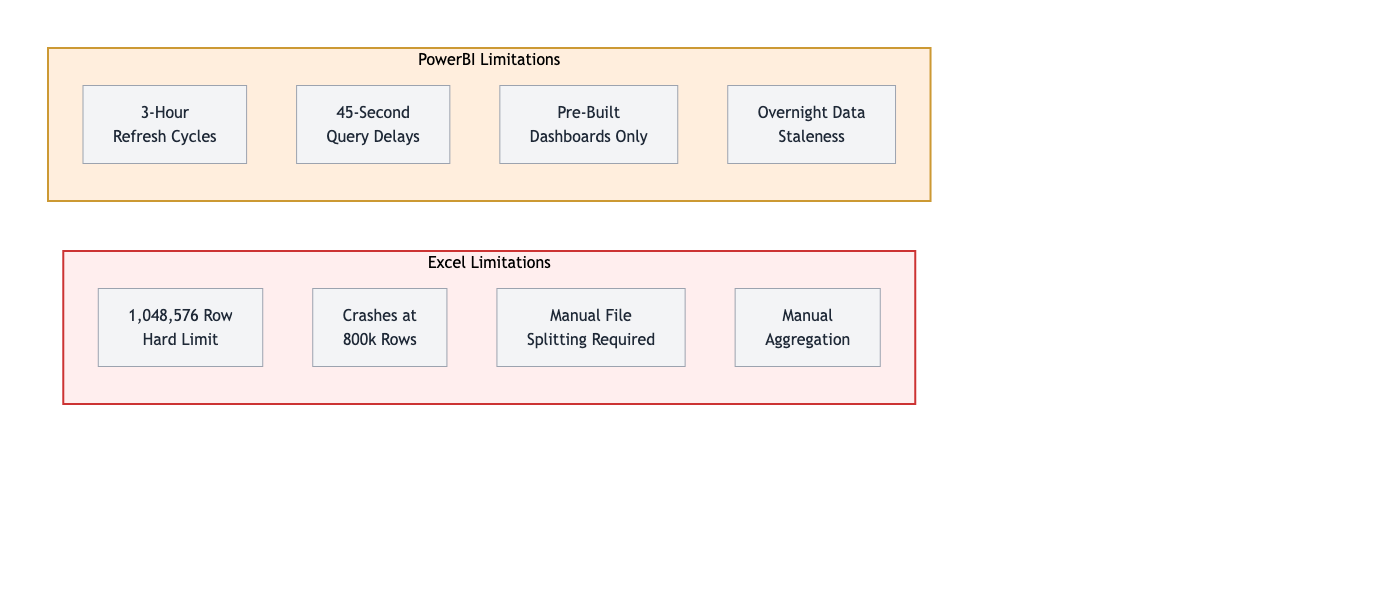
Excel has a maximum of 1,048,576 rows. For consolidated bordereaux analysis across multiple coverholders, this becomes constraining. A syndicate with 40 coverholders generating 2.5 million rows monthly must split data across multiple files.
The workaround: analyse by coverholder, then manually aggregate. Cross-portfolio questions require opening multiple files, running individual analyses, combining results. Time-consuming. Error-prone.
Performance degrades significantly above 500,000 rows. Files freeze. Cross-portfolio analysis requires manual aggregation across 40+ separate result sets.
PowerBI Trade-Offs
PowerBI handles millions of rows effectively. A significant improvement over Excel for large datasets. Three challenges remain for real-time bordereaux analytics:
Refresh cycles: Large bordereaux datasets take 2-3 hours to refresh. Data import, Power Query transformations, relationship calculations, aggregations, and index rebuilding all take time. Overnight scheduling works for static reporting. Questions arising during the day must wait for the next refresh cycle. Real-time portfolio queries aren't practical.
Query performance: Complex dashboards with millions of rows face performance constraints. Simple queries take 5-10 seconds. Complex cross-portfolio aggregations with multiple drilldowns can take 45-90 seconds. Drilling through dimensions sequentially adds delays at each step. Exploratory analysis requires patience.
Pre-configured dashboards: PowerBI excels at answering anticipated questions. Ad-hoc questions not pre-built into the dashboard require development work. Adding new DAX measures or modifying Power Query logic requires technical expertise and time.
Purpose-Built Bordereaux Analytics
Purpose-built tools approach bordereaux analytics differently. Instead of adapting general business intelligence tools, they're designed specifically for insurance data workflows.
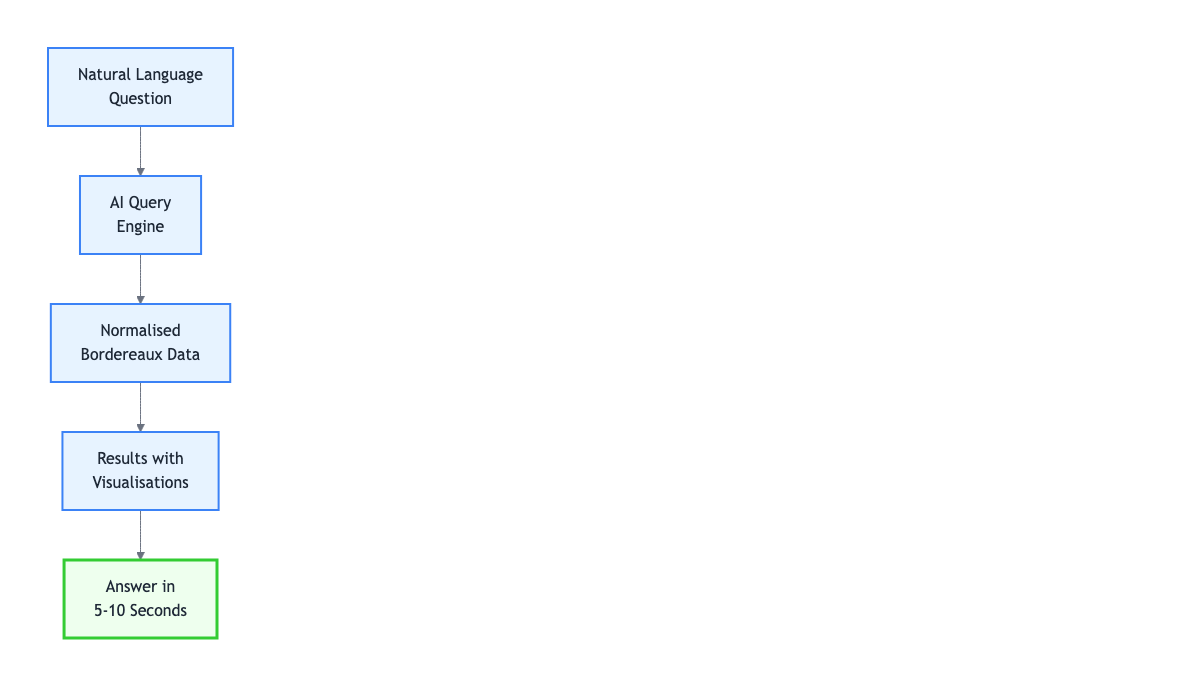
Natural language queries: type the question, get the answer. "Show total California earthquake exposure by binding authority" or "Which coverholders have loss ratios above 75% this quarter" - each answer returns in 5-10 seconds.
What Changes with Purpose-Built Analytics
Traditional approach requires manual extraction, transformation, loading, then querying. Each step takes time. Purpose-built platforms handle normalisation automatically and continuously.
Automatic format handling: Different coverholder formats - date layouts, territory codes, column naming - are handled without manual mapping. New submissions are processed automatically once the format is learned.
Immediate availability: Bordereaux submissions become queryable within minutes of arrival, not hours or days. No refresh cycles. No overnight batch processing.
Natural language interface: Type questions in plain English. Results appear with visualisations. Follow-up questions understand context. No dashboard pre-building required.
Continuous monitoring: Data quality issues, premium anomalies, and loss ratio trends are flagged automatically as they occur.
Practical Use Cases
Binding authority renewal: Traditional approach requires 2 days of data extraction and preparation before renewal meetings, resulting in 2-week-old data. Purpose-built tools allow querying performance during the meeting itself - loss ratios, premium trends, claims frequency appear in seconds with current data.
Catastrophe exposure: Hurricane approaching Florida. Traditional Excel/PowerBI approach requires 3-4 hours to extract, split files, run pivot tables, aggregate manually. Purpose-built query "total Florida exposure by peril and sum insured band" returns results in 10 seconds.
Data quality monitoring: Traditional approach involves building dashboards that refresh overnight and are reviewed weekly. Issues spotted retrospectively. Purpose-built systems monitor continuously, flagging anomalies same day: "Coverholder XYZ submission has 8% missing sum insured values, historical average is 0.3%"
Ad-hoc portfolio analysis: Underwriting meeting question: "Are we seeing claims frequency increase in any particular segment?" Traditional PowerBI requires noting the question, analyst builds analysis over 2 days, schedule follow-up meeting. Purpose-built approach: type the question, results appear immediately, discussion proceeds with data in hand.
What Changes
Real-time portfolio view: Current exposure position, not monthly snapshots. Policy bound this morning appears in analysis immediately. Portfolio decisions based on current data, not last month's snapshot.
Faster risk identification: Spot loss ratio trends and concentration issues as they develop, not quarterly in arrears. Early warning allows proactive management. Deteriorating loss ratios addressed before they become material.
Instant binding authority analysis: Performance data available on demand. Loss ratio, premium trend, data quality metrics, claims frequency. Current data, not historical analysis. Renewal decisions made with complete information.
Rapid catastrophe response: Large loss event queries return results in seconds. Exposure by territory, affected binding authorities, estimated claims impact. Response time measured in minutes, not hours or days.
Proactive data quality management: Issues flagged automatically as they occur. Missing data, format changes, validation failures surfaced immediately. Problems corrected before they compound.
Some Lloyd's syndicates managing large bordereaux volumes have moved to purpose-built analytics platforms designed specifically for insurance data. The technical advantages - automatic normalisation, columnar storage, natural language queries, continuous processing - translate directly to operational benefits.
BDXML processes bordereaux and provides automated analytics in real-time. Natural language queries, automatic normalisation, no refresh delays. Get in touch to discuss bordereaux analytics.